Every few months, a new wave of AI hype convinces WordPress site owners that some chatbot is about to make their plugins obsolete.
It's an understandable assumption – today's AI can write blog posts, generate marketing copy, produce surprisingly good PHP, and explain WordPress APIs in seconds. If AI can do all of that, why would you still need a plugin?
The short answer: no, AI can't replace WP User Frontend Pro – because the two solve different problems. AI generates ideas, content, code, and recommendations. WP User Frontend Pro executes functionality inside WordPress: forms, registrations, payments, and the workflows a live site depends on.
Ironically, the plugin itself proves the point. Instead of treating AI as a rival, WP User Frontend Pro uses it exactly where it adds value – speeding up form generation and content review – while leaving the critical infrastructure to proven WordPress code.
This article explains why that distinction matters, and how the two actually complement each other.
What Actually Happens When Someone Clicks “Submit”
Here's a typical frontend submission, step by step:
- Visitor opens the frontend form and enters information
- WordPress verifies the security nonce and checks user permissions
- Each field is validated and sanitized
- Uploaded files are processed into the Media Library
- A new post is created, with metadata, categories, and author assigned
- Notification emails and automation hooks fire
- Payment status is verified, if applicable
- The confirmation page displays
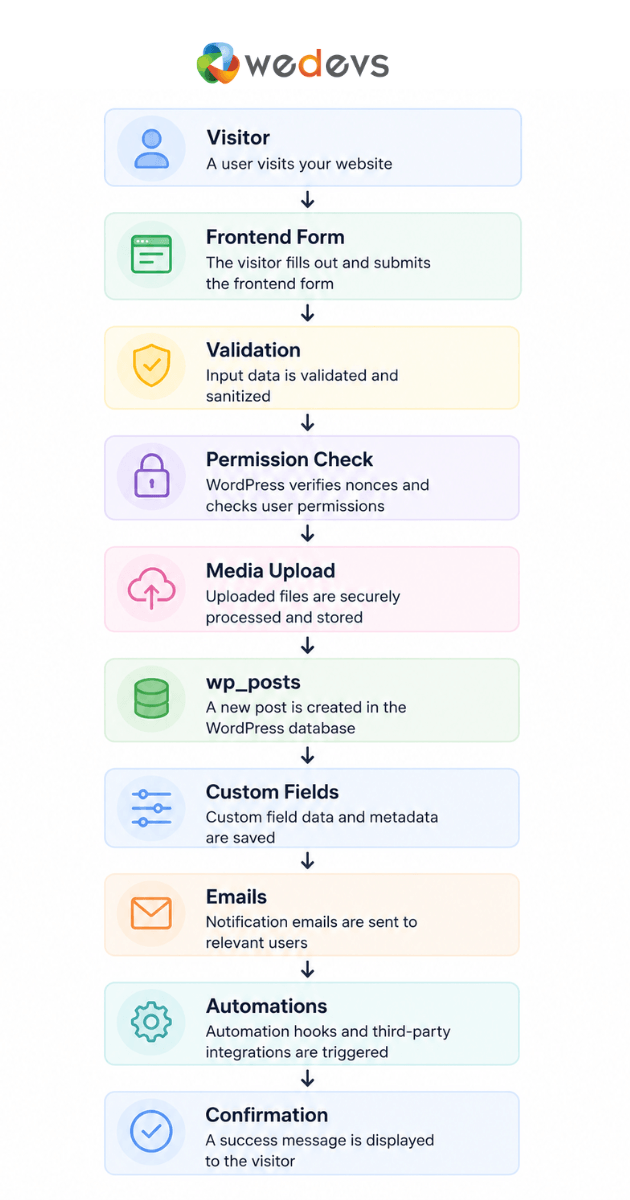
Every step here is real application logic: the database changes, hooks fire, permissions are enforced, files get stored.
Now ask: where is AI in this workflow? It isn't. AI may have helped the site owner draft the form's copy or generate some CSS beforehand, but once a visitor clicks Submit, AI isn't the system running the site. WP User Frontend Pro is.
“I'll Just Have AI Write the Plugin Instead”
Ask ChatGPT or Claude to “let my users submit blog posts from the frontend of my WordPress site,” and you'll get a solid first draft: PHP, HTML, maybe some hook examples.
What you won't get is a form that's actually live on your site, validating input, checking permissions, and writing to your database. That gap is the whole ballgame.
A reasonable follow-up objection: if AI can't run the site directly, why not have it generate a custom replacement and skip the plugin?
Because generating code is the easy part; maintaining production software for real users is the hard part. By the latest version, WP User Frontend Pro has grown into a full frontend application framework, including:
- A form builder supporting post submission, registration, and profile forms, with multi-step layouts and per-step validation
- 40+ specialized field types: signatures, ratings, address and country pickers, Google Maps location, age-validated date fields, repeatable groups, and five separate pricing field types with live totals
- A payments layer built on Stripe, handling subscriptions, one-time payments, coupons, and country/state tax rules
- Maintained integrations with Dokan, WooCommerce, WC Vendors, WCFM, BuddyPress, Paid Memberships Pro, The Events Calendar, six email marketing platforms, and Zapier/n8n automation
Recreating even a fraction of this with AI-generated code is achievable for a single feature. Recreating and maintaining all of it – through WordPress core updates, PHP version bumps, Stripe API changes, and newly discovered security issues – becomes a permanent job.
Even if AI writes 90% of the code, someone still owns 100% of the maintenance. A developer retainer for even a few hours a month costs more per year than a plugin license – and that recurring cost is the part most “just use AI” arguments quietly skip.
And yes, AI coding tools can help with the maintenance too. What they can't take over is ownership: someone still has to test every core and PHP update, react when Stripe changes its API, and answer for a security report at 2 a.m. With a maintained plugin, that responsibility sits with the vendor and its changelog. With AI-generated custom code, it sits with you.
Why This Matters for Businesses That Run on WordPress
For businesses running directories, marketplaces, or membership sites, the real question isn't whether AI can generate code; it's whether that code can be trusted to power a production website day after day.
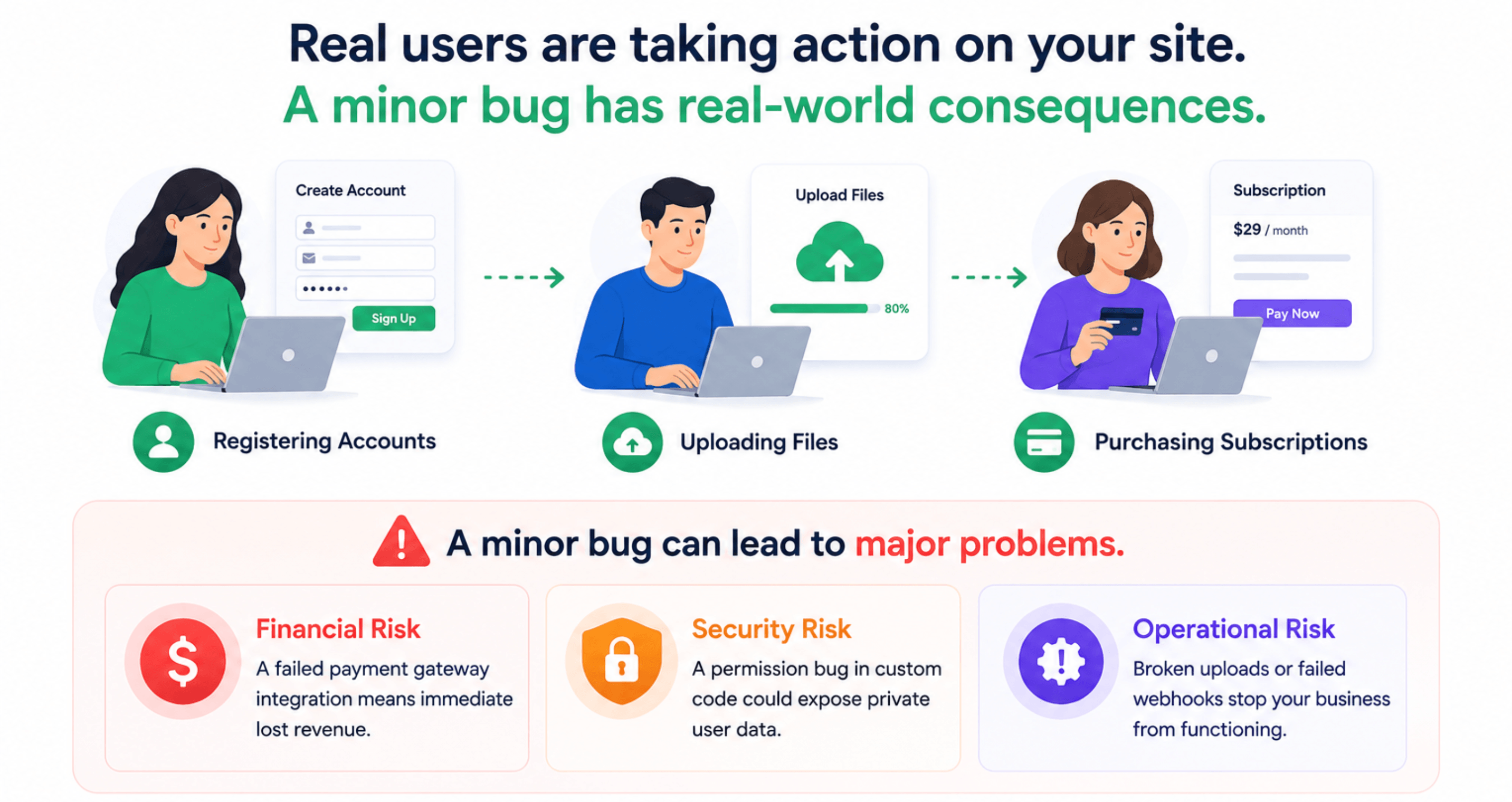
When real users are registering accounts, uploading files, and purchasing subscriptions, a minor bug has real-world consequences:
- Financial Risk: A failed payment gateway integration means immediate lost revenue.
- Security Risk: A permission bug in custom code could expose private user data.
- Operational Risk: Broken uploads or failed webhooks stop your business from functioning.
These aren't problems you can solve with another AI prompt. They're operational challenges that require predictability.
A mature plugin like WP User Frontend Pro isn't just a collection of PHP files; it's continuously maintained infrastructure that evolves alongside WordPress core releases, changing third-party APIs, and new security threats – a tested foundation, instead of thousands of lines of fragile generated code for your team to babysit.
AI Is Already Inside WP User Frontend Pro – As a Feature, Not a Replacement
Here's what really settles the debate: the plugin didn't ignore AI. It built AI in, precisely where AI is strongest.
AI Form Builder
Rather than dragging fields onto a blank canvas one by one, admins can prompt the AI to generate a starting template – for example, a Dokan vendor registration form or a WooCommerce product submission form.
WPUF Pro ships pre-built AI templates for Dokan, WC Vendors, WCFM, WooCommerce, EDD, and Events Calendar workflows. The AI drafts the skeleton; WPUF Pro's field system, validation, and submission handler do the actual work of making it function on a live site.
AI Post Review
When a user submits or edits a post, the submission is handled normally first – created, saved, and permissioned exactly as WordPress expects. Only afterward does AI get involved: a review is scheduled 10 seconds later via Action Scheduler, so the reviewer never slows down the person submitting the form.
The review runs under deliberately conservative settings – low temperature, capped token length, timeout and retry limits, hourly rate limiting – and produces a summary that's stored for a human moderator to act on.
Notice what that AI review doesn't do: it doesn't publish the post, approve or reject it, assign roles, or process payment. It generates a recommendation; the plugin executes everything around it.
That's the correct division of labor, and it's the same principle behind aircraft autopilot: automation assists, but the pilot stays responsible.
What AI Can and Can't Replace
The word “replace” gets used too broadly in these conversations. AI genuinely excels at:
- Writing field descriptions, confirmation emails, and FAQs
- Drafting documentation and support replies
- Suggesting validation messages and rewriting marketing copy
- Generating starter CSS or explaining an API
These are creative, language-driven tasks – a natural fit for AI. What AI does not replace is the software responsible for authenticating users, storing data, processing submissions, managing uploads, enforcing permissions, handling payments, and integrating reliably with a dozen other plugins. That's application-layer work, and it's exactly where WP User Frontend Pro operates.
So the better question isn't “Can AI replace WP User Frontend Pro?” It's “How much of WPUF Pro's workflow can AI make faster?” Right now, the answer is: quite a bit – without ever touching the plumbing underneath.
Myth vs. Reality
| Myth | Reality |
|---|---|
| AI can replace any WordPress plugin | AI generates content and code; plugins execute functionality inside WordPress |
| AI-generated code eliminates the need for plugins | Generated code still needs testing, maintenance, and long-term support |
| AI can manage my WordPress database | WordPress and its plugins handle database operations and data integrity |
| AI can replace frontend submission systems | AI can help design forms, but it doesn't process submissions or integrate with WordPress on its own |
| AI makes plugins obsolete | Plugins are increasingly adopting AI features rather than being replaced by them |
The trend isn't AI versus plugins; it's AI inside plugins – and WP User Frontend Pro is a working example of that shift.
FAQ: Can AI Replace WP User Frontend Pro?
Can AI replace WP User Frontend Pro?
No. AI can generate code, content, and documentation, but WP User Frontend Pro provides the runtime functionality that actually executes inside WordPress – processing submissions, enforcing permissions, and handling payments on a live site.
Can AI build frontend forms?
Yes, in the sense of generating HTML, CSS, and PHP. But that code still has to be integrated, validated, secured, and maintained inside a live WordPress site – which is the part WP User Frontend Pro already handles.
Can AI replace WP User Frontend Pro if I'm using Elementor?
No. Elementor designs pages, and AI can speed that up with layouts, content, or custom CSS. Neither one processes frontend submissions, registrations, or payments. WP User Frontend Pro integrates with Elementor, so page design and frontend functionality work together without custom glue code to maintain.
Does WP User Frontend Pro use AI?
Yes. WP User Frontend Pro includes an AI Form Builder and AI Post Review, using AI to speed up form creation and content moderation while core application logic stays in proven WordPress code.
Should I use AI together with WP User Frontend Pro?
Yes – they're complementary. AI helps you plan, draft, and customize; WP User Frontend Pro handles the forms, payments, integrations, and operational workflows that keep your site running.
The Bottom Line
AI isn't an execution environment. It doesn't authenticate users, process payments, or maintain long-term compatibility with the WordPress ecosystem. That's application software's job – and it's exactly what WP User Frontend Pro is built for.
Rather than trying to replace mature software with AI, WPUF Pro incorporates AI where it creates real value and leaves critical infrastructure to code designed for WordPress. That's not a compromise; it's good software design.
The real question isn't AI or WP User Frontend Pro. It's how to use AI to get more out of it.